
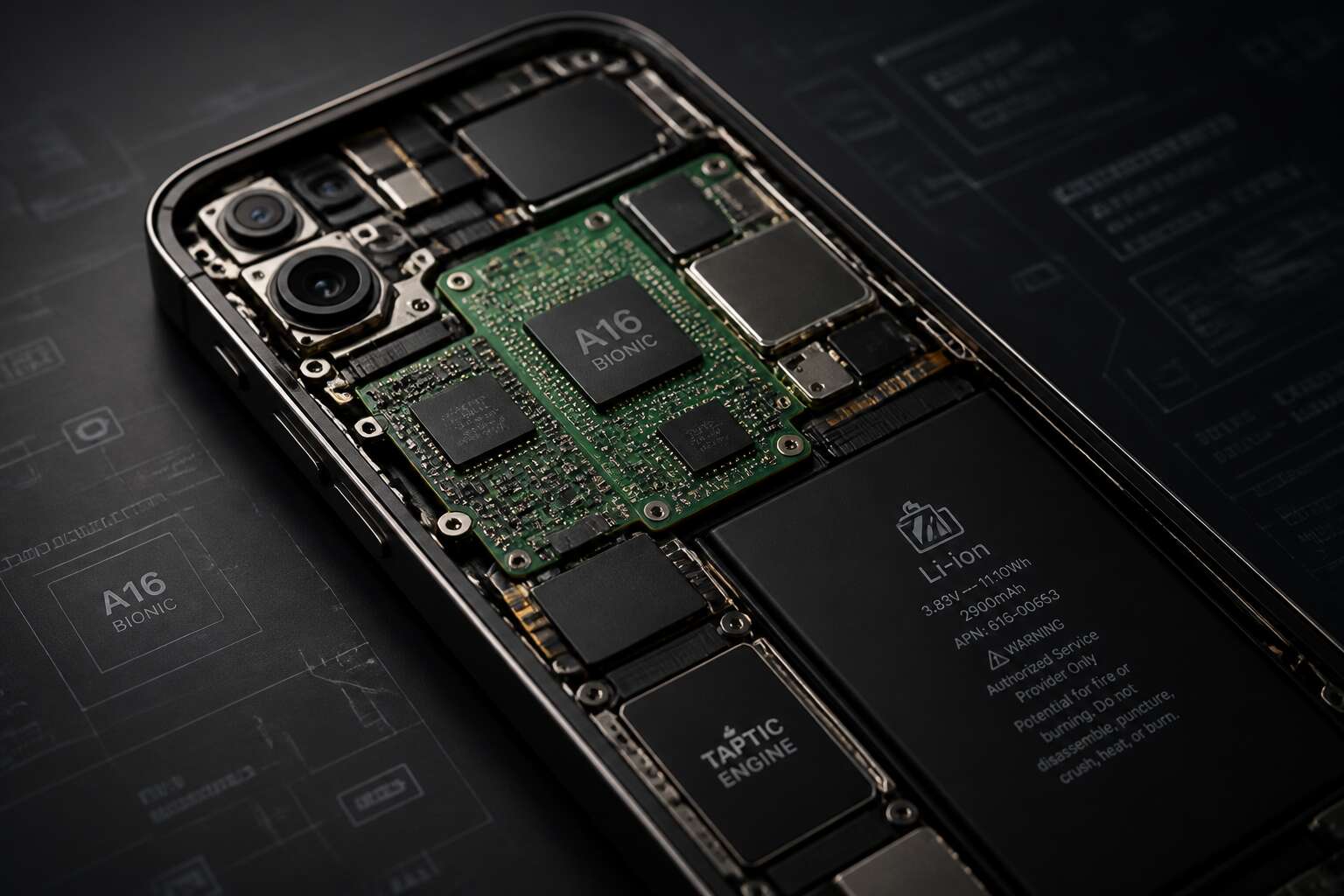
Anatomy of a Smartphone Mainboard
The Core Role of the Logic Board
Just over a decade ago, a smartphone mainboard housed fewer than fifty active components. Today, that number exceeds 400. A motherboard mobile is a dense, layered assembly of silicon and copper.
The logic board coordinates every signal. It manages power, data, and display output. Without it, the processor and memory remain inert. I have seen entire systems rendered useless by a single misplaced resistor on this core layer.
- Application processor and graphics unit
- Modem for cellular and Wi-Fi
- Power management IC
- NAND flash and DRAM modules
- Sensor hubs and audio codecs
The core role of the logic board is keeping these parts in sync. Signal timings measure in nanoseconds. In my repair experience, a single damaged trace can disable the entire device.
Layered Architecture and PCB Materials
Twelve layers of copper and glass fit within three millimeters on a modern motherboard mobile. The PCB is a sequence of bonded laminates, not a single slab. FR-4 dominates as the base material, a glass-reinforced epoxy that resists heat and moisture. Prepreg layers melt and fuse under pressure, while solder mask forms the outer surface.
A typical stack reveals order:
- Signal layers carry data across the board
- Power planes deliver steady current
- Ground planes absorb interference
Microvias, buried and blind, thread connections through the substrate. In my repair bench, I have watched a board fail due to a single delaminated core. The layered architecture is unforgiving; precision is absolute.
How the Mainboard Connects Components
Every tap, swipe, and call depends on a single moment of electrical handoff across the board. The mainboard’s true test is connectivity, because each component, from the camera module to the charging port, must link to the central processor through dedicated pathways. A modern motherboard mobile relies on board to board connectors and flex cable assemblies, each engineered to survive thousands of bends. I have seen a loose connector cause a phone to mimic a battery failure, a reminder that contact integrity rules over raw speed.
- Spring loaded pins for battery and antenna contacts.
- Soldered ball grid arrays for processor and memory.
- Shielded flex cables for display and fingerprint sensors.
The links are not uniform. Some carry power, others pulse with data, and a few exist purely for grounding. Together, they turn a laminated slab into a motherboard mobile that responds to touch.
Common Terminology for Mobile Boards
Open any phone and you will find a motherboard mobile that will happily confuse you. I have yet to meet one that labels its own parts. The system on chip (SoC) handles all the heavy thinking. The power management IC (PMIC) regulates voltage. The RF transceiver runs the cellular radio. The NAND flash stores your digital clutter. Each one earns its place!
Common board terminology becomes easier when you meet the parts:
- SoC: the combined processor, GPU, and modems
- PMIC: the power regulator
- RF transceiver: the cellular radio
- NAND flash: the permanent memory
With those four labels, a motherboard mobile becomes readable.
Critical Components Soldered on the Board
Processor and Memory Integration
Every smartphone today, from Cape Town to Pretoria, runs on a motherboard mobile that fuses its most critical parts into a single unit. The processor and memory are soldered directly onto the substrate using a ball grid array. Processors and LPDDR RAM share this dense platform. The close proximity shortens signal paths, which lowers latency and reduces power consumption. Engineers call the combined package a system on chip, with the application processor, graphics core, and modem on the same silicon die.
Permanently soldered components on a motherboard mobile include:
- application processor
- graphics core
- baseband modem
- power management IC
- NAND flash storage
In my years working with mobile hardware, I have learned to appreciate that permanence. This monolithic approach defines how the board handles performance. There is no physical socket, no upgrade path, yet the tradeoff delivers a slimmer, cooler, and faster device!
Power Management and Battery Circuits
A single millisecond of voltage instability can stop a phone mid-call. That explains why the motherboard mobile relies on a power management integrated circuit. This component governs every voltage rail across the device. A faulty solder joint on this circuit can interrupt charging or cause random reboots. I have watched battery circuits deliver unstable current due to cracked traces.
The PMIC pairs with a charging controller that regulates input from the USB port. Battery connectors on the board carry both power and sense lines for accurate gauging. Key soldered elements include:
- power management unit
- battery connector
- charging coil
- current sense resistor
These parts form a closed system that protects the board from surges. Without them, temperature spikes and voltage drops would shorten the phone’s lifespan.
Connectivity Chipsets: Modem and Radio
Your phone quietly hunts for signal across dozens of frequency bands every second. The modem and radio chips on a motherboard mobile manage this constant negotiation, converting digital data into radio waves and back again. Without these soldered components, calls drop and data stalls.
The modem baseband processor manages cellular, LTE, and 5G signals. The RF transceiver feeds it, while the power amplifier boosts weak signals before they reach the antenna. A cracked solder joint on the amplifier silences your phone completely! These chips form the radio section that governs every wireless connection the device makes.
Key elements soldered on the motherboard mobile include:
- modem baseband processor
- RF transceiver
- power amplifier
- antenna switch
In South Africa, where network towers are spread unevenly, I have watched these parts decide whether a call survives the drive from Johannesburg to Mpumalanga. Every message you send relies on their integrity.
Storage and Audio Hardware
On a motherboard mobile, storage and audio hardware occupy tightly packed corners. The UFS chip stores all your photos and messages using embedded flash memory. Its design handles temperature swings common in South African summers. Nearby, the audio codec converts digital data into analog signals. The speaker amplifier then boosts that signal for headphones or external speakers. These soldered components include:
- UFS storage chip
- audio codec
- speaker amplifier
They share limited space with power and radio circuitry. I have watched a cracked solder joint on the audio codec produce complete silence. Storage failures usually show up as corrupted data. The motherboard mobile integrates these parts permanently. That soldering prevents user upgrades, so reliability depends on the original assembly.
Sensors and Peripheral Interfaces
The motherboard mobile hides a world of tiny sensors near its outer edge. These soldered components convert your physical actions into machine language. An accelerometer notices your hand changing the screen angle. A gyroscope detects rotation for gaming. The proximity sensor kills the display during calls, and an ambient light sensor adjusts brightness.
- Accelerometer for tilt and shake
- Gyroscope for rotational speed
- Proximity sensor for face detection
- Ambient light sensor for auto brightness
Peripheral interfaces live on the same board. The USB port, the display ribbon seat, and the touch controller all rely on soldered pads. The speaker and microphone contacts also pass through these traces. In Johannesburg heat, cracked joints on these interfaces produce intermittent failures that are hard to diagnose. The motherboard mobile’s reliability depends on every single one of those tiny connections.
Evolution and Design Variations
From Single-Board to Modular Designs
I have witnessed the motherboard mobile abandon its monolithic form. Early devices carried all circuits on one rigid plane. A single fault in that layout meant death for the entire handset.
Designers then began splitting functions into separate boards. The modem came apart, power management followed. Each module communicates through a standard bus, permitting replacement without discarding the whole.
- Single-board foundations remain common in entry-level phones.
- Modular variations serve repair-focused markets across South Africa.
- Both forms trace lineage to the same motherboard mobile ancestry.
Stacked and Flexible PCB Innovations
Physical constraints forced designers to rethink the flat plane. Stacked boards, using vias to interconnect layers, allow the motherboard mobile to increase circuit density without expanding the footprint. This approach supports the dense logic found in mid-range devices, making repairs more intricate but ultimately serviceable.
Flexible PCB innovations take a different route. Instead of stacking, they bend the substrate, wrapping circuits around battery packs or folding them into hinge mechanisms. This appears in foldable phones and compact waterproof models. I appreciate how this creates unique repair challenges for local technicians across South Africa.
- Reduces physical stress on solder joints
- Allows dynamic motion without cable breaks
- Saves internal volume for larger batteries
These variations show that the motherboard mobile adapts its physical form to the mechanical shell. The logic board fits the device, not the other way around.
Impact of Size and Layout on Performance
Smaller doesn’t always mean faster. On a motherboard mobile, the physical layout dictates how efficiently signals travel between processor, memory, and modem. Shorter trace paths reduce latency, which is why premium devices often place chips closer together. But density introduces a tradeoff. Heat concentrates in smaller regions, forcing throttling that slows performance during heavy use.
Engineers balance component placement against thermal zones and antenna clearance. In South Africa, where ambient temperatures run high, a cramped layout can cause unexpected lag on mid-range handsets.
- Trace length affects signal integrity
- Component spacing impacts heat dissipation
- Battery size limits available board area
These factors explain why two phones with identical processors perform differently. The board serves the device’s mechanical constraints first, and that shapes every benchmark.
Waterproofing and Shielded Enclosures
In Cape Town’s rainy winters, a single splash can end a phone’s life. Waterproofing forced design variations that protect the motherboard mobile without shrinking its functionality. Manufacturers now coat boards with conformal films, seal every port, and glue the chassis shut.
Shielded enclosures add another layer. Metal cages around the main logic block block electromagnetic interference from the modem and radio. South African users in dense urban areas benefit from fewer dropped signals. These changes determine how long a device survives daily wear.
- Nano-coating for moisture resistance
- Gasketed SIM trays
- Soldered shield cans for RF isolation
The evolution keeps pace with harsher environments. A thicker gasket or a better grounded cage often matters more than raw processor speed.
Comparing High-End and Budget Mainboards
A flagship motherboard mobile can cost ten times more than a budget version. Evolution split these boards into distinct paths. High-end designs favor dedicated components. Budget variants combine functions into fewer chips.
Material choices highlight these differences:
- Higher-grade capacitors on flagship boards
- Standard capacitors on budget boards
- Stricter solder joint inspection for premium units
A premium board handles rapid app switching without heat buildup, while a budget one throttles during video calls. Over time, choices shape repairability. A budget board with fewer modules is harder to service, while a premium board offers separate sections. That matters for South African users planning long-term use.
Troubleshooting and Maintenance
Signs of a Failing Logic Board
I’ve seen a phone’s logic board signal trouble long before it stops working. A boot loop, a phantom touch, or battery drain without explanation are the early signs of failure. In South Africa’s heat, thermal stress accelerates these symptoms.
Watch for these warning signs:
- Random restarts during light tasks
- Charging port that works only at certain angles
- Distorted earpiece audio
Each symptom points to microcracks or failing power management circuits. Regular cleaning and avoiding extreme temperatures can extend the motherboard mobile lifespan, but early diagnosis prevents data loss.
Diagnosing Shorts and Power Issues
When a motherboard mobile refuses to power on, the first step is isolating the fault. I start by checking the battery connector with a multimeter. A reading below 3.7 volts often points to a short in the charging circuit rather than a dead cell.
Thermal imaging reveals hot spots that are otherwise invisible. In Johannesburg’s climate, a board that heats unevenly during charging usually has a damaged capacitor. The repair requires removing the shield can and probing each power rail.
- Disconnect the battery and measure resistance across the main power lines
- Inject a low voltage into the suspected rail and watch for current draw
- Apply isopropyl alcohol and look for evaporation points that betray shorts
That method has saved countless devices from the scrap bin! A motherboard mobile with a clean power delivery path performs reliably, but only if the diagnostic work precedes any component replacement.
Micro-Soldering and Repair Techniques
Fixing a motherboard mobile at component level demands patience more than expensive gear. I have seen technicians in Johannesburg skip the flux and regret it. A reballing station, quality solder wire, and a steady hand matter more than your microscope.
When replacing a damaged power IC, I remove the shield can first. Then set the hot air station to 320 degrees Celsius with low airflow. Too much heat lifts adjacent pads. Too little leaves the chip stuck!
- Use fresh solder paste and a stencil matching the BGA pitch
- Clean the pad area with wick and isopropyl alcohol before use
- Apply conformal coating after rework to guard against humid air
Trace repair on a motherboard mobile requires a different discipline. Scrape back the solder mask, tin the exposed copper, and bridge with fine enamel wire. In Durban’s humidity, corrosion develops inside every micro fracture. Sealing the repair with UV resin prevents recurrence.
Replacing a Board vs. Upgrading Devices
The eternal smartphone dilemma in Johannesburg is not about brands, it is about whether your motherboard mobile deserves a further investment. I have seen people spend R2,000 on a board swap for a phone worth R1,500. That is economic madness!
Replacing a board often extends the life of everything else. The battery, screen, and chassis remain. But if the display is cracked or the software updates have stopped, you are maintaining outdated hardware. Upgrading to a new device gives you warranty, modern connectivity, and no hidden corrosion.
Here are the usual compromises:
- The replacement part often costs half the new device’s price.
- Your current phone may lack the latest security patches.
- A genuine motherboard mobile from a supplier in Gauteng is not always available.
Sometimes the sentimental value wins. That is fine. Just do not pretend it is a financial decision.
Tips to Extend Motherboard Lifespan
Heat damages any motherboard mobile. Direct sunlight on a dashboard or a thick case traps warmth and accelerates component fatigue. Charge with a reputable adapter, because cheap chargers deliver erratic voltage that harms power delivery circuits. Physical impact is another issue. A drop can crack microscopic solder joints even when the screen survives. Clean the charging port with a wooden toothpick and compressed air every few months. Lint buildup creates resistance, forcing the board to work harder.
- Set battery charge limit to 80% for daily use.
- Avoid extreme cold as well, condensation inside can short traces.
- If the phone gets hot during navigation, remove the case temporarily.
These steps do not guarantee durability, but they reduce the need for a motherboard mobile replacement in Pretoria or elsewhere.
Choosing the Right Mobile Mainboard for Your Needs
Compatibility with Your Device Model
The wrong motherboard mobile can silently destroy a perfectly good device. I have seen technicians fit a board with the wrong flex connector, and the result was a dead screen and a frustrated customer.
Compatibility starts with your exact model number. South African users often buy boards online from overseas sellers, but the regional variant matters for network bands. A board designed for the Asian market may not support local LTE frequencies.
- Check the PCB revision number
- Compare the connector layout
- Verify the bootloader compatibility
Matching these details saves time and money. A board that appears identical on paper can fail to initialize your touchscreen.
Features to Prioritize in a Replacement
Every South African repairer has a story about a board that failed after the warranty stamp dried. The market is crowded with boards stripped from dead units, and their condition only reveals itself under load. When you select a motherboard mobile for a client’s device, examine three priorities: provenance, power delivery, and thermal history.
Ask the supplier for the board’s test report. A reputable seller will share current draw measurements and CPU stress test results. If they hesitate, walk away. The cheapest board becomes expensive when your client loses their photos.
- Swollen capacitors near the charging coil
- Discolouration around the processor die
- Scratched flex connector fingers
South Africa’s unstable grid makes voltage spike damage common. Verify that the power management IC matches your device’s regional firmware.
Your choice defines your repair’s lifespan. The right motherboard mobile has traceable origins and clean power rails.
Quality Indicators and Reliable Suppliers
Selecting a motherboard mobile as a repairer means treating “like new” with suspicion. I once saw a replacement board that looked pristine until the client plugged in their charger. The internal voltage regulator toggled wildly, and the handset shut down mid call. That unit now sits in a drawer labelled “educational.”
Quality indicators go beyond cosmetic checks.
- Inspect solder joints under magnification for reflow signs
- Check for laser-etched manufacturing date codes
- Confirm moisture indicator dots inside the board remain white
Reliable suppliers in South Africa keep a physical premises and allow board inspection before payment. They understand load shedding and store motherboards in antistatic shielding. A board with a clear lineage saves your reputation. I prefer paying for transparency, not for hope.
Cost Considerations and Warranty
Replacing a motherboard mobile often costs more than the device’s resale value. South African repairers face currency fluctuations and scarce stock, so the price tag needs scrutiny. Ask for a breakdown that includes import duties and shipping fees. A cheap board loses its appeal after unexpected customs charges.
Warranty terms on a motherboard mobile separate dependable suppliers from those selling chances. Look for coverage that starts at installation, not dispatch. The supplier should define what voids protection, such as liquid damage or prior repair attempts. Reliable warranties include:
- A minimum of six months on functionality
- Free diagnostics if faults appear
- Replacement or refund for DOA units
In my experience, testing the board before paying remains essential. Request a bench test with your own charging cable and earpiece. That step reveals intermittent faults and gives you a clear picture of what your warranty actually protects.
Future-Proofing with Newer Chipsets
In South Africa, rolling blackouts force many users to keep backup phones alive far longer than they planned. A motherboard mobile from an older generation can quietly outlive its software support, and that is why future-proofing with newer chipsets deserves attention!
A recent Snapdragon or Dimensity board handles upcoming Android releases, and it manages power more efficiently during extended outages. I have seen devices from 2021 fail to keep up with modern banking apps simply because the chipset aged out.
- A chipset released within the last two years
- 5G modem support for Vodacom and MTN bands
- Efficient power delivery for extended battery use
Choosing the right board today prevents a forced upgrade next year.
Environmental Impact and Recycling
Around 360,000 tonnes of e-waste are generated in South Africa each year, and a motherboard mobile directly contributes to that figure. Choosing a replacement board with environmental impact in mind means looking for manufacturers that use recycled metals and avoid hazardous solder.
Recycling begins with design. A modular mainboard allows easy separation of components, so precious gold, copper, and palladium can be recovered without shredding the whole unit. Local repair shops often harvest working chips from dead boards, extending the life of the original mainboard.
Before you discard an old logic board, consider these steps:
- Remove the battery and connectors for separate disposal
- Check for municipal e-waste drop-off points in Johannesburg, Cape Town, or Durban
- Ask your repair technician about component harvesting programs
The right choice today reduces tomorrow’s toxic landfill.
0 Comments