
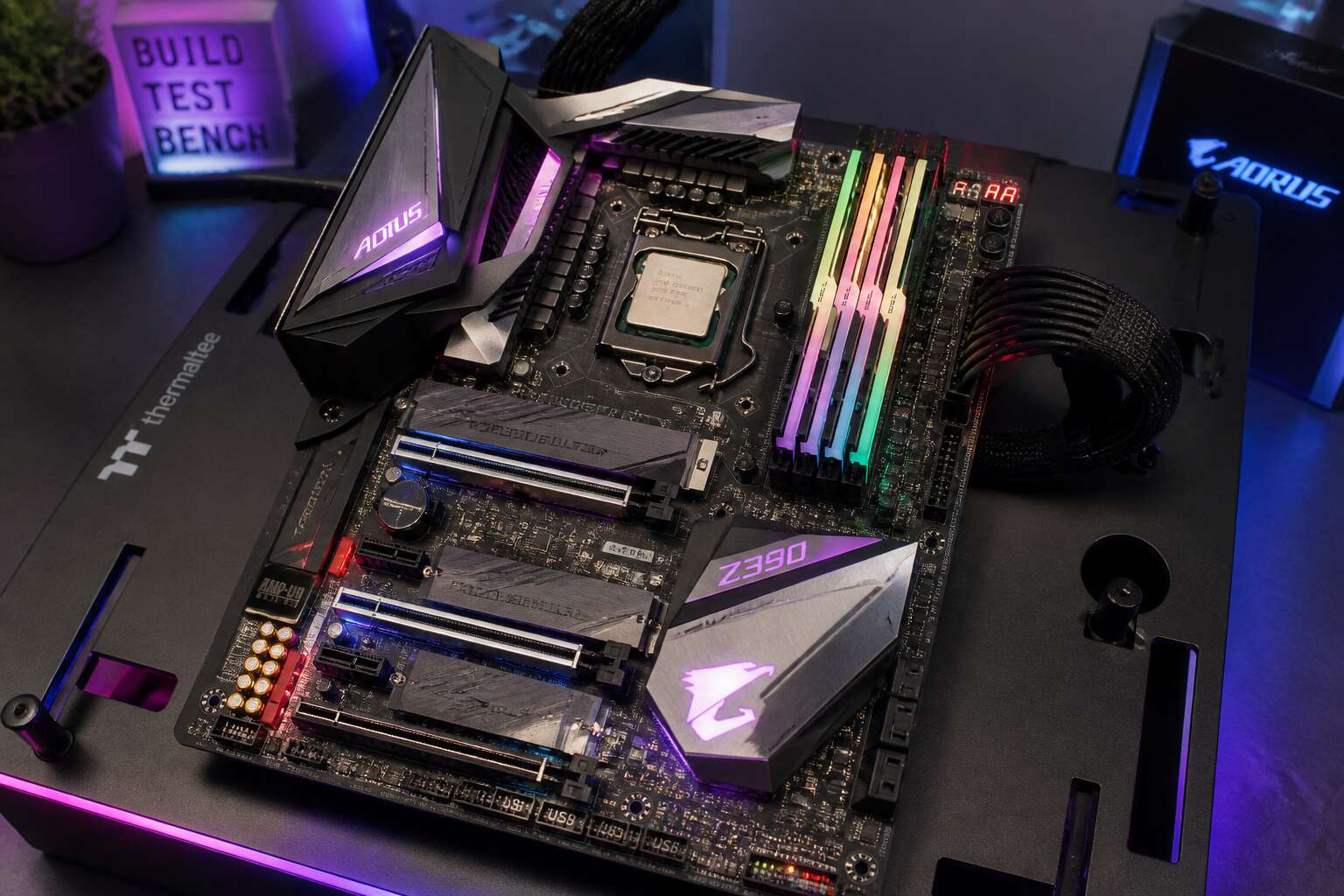
Unveiling Intel’s Z390 Platform
The Road from Z370 to Z390
Intel’s naming conventions have always been a masterclass in gentle confusion. When the Z390 chipset arrived, many assumed it was a ground-up revolution. Instead, it was a polite refinement of the Z370 architecture, a chipset that had itself been a bit of a stopgap. The transition is less about a complete overhaul and more about a shrewd addition of features that users were already begging for. This is the road from Z370 to Z390, and it is paved with good intentions and a few necessary compromises.
The most tangible shift involves connectivity. The Z370 relied heavily on external controllers for modern I/O, which worked but added cost and latency. The Z390 platform brought native support for a slew of standards that were previously bolt-on extras. This is the heart of the upgrade, and for the South African enthusiast looking to build a future-proof rig without exporting their entire salary, it matters.
– Native USB 3.1 Gen2 support for faster external drives.
– Integrated Intel Wireless-AC 9560 for Wi-Fi and Bluetooth, no separate card needed.
– Up to six USB 3.1 Gen2 ports straight from the chipset.
For the average user, the daily difference between Z370 and Z390 is minimal until you start plugging in high-speed peripherals. Yet the platform’s real claim to fame is the support for the 9th Gen Intel Core processors, which was its primary reason for existence. The Z370 presented a confusing situation where it technically could support these CPUs, but only with a BIOS update that felt like a risky secret handshake. The Z390 motherboard arrived as the official, integrated solution, designed to handle the higher power demands and the improved memory controllers of the new chips without breaking a sweat.
However, Intel’s claims of a 10% performance boost were based on ideal conditions flagrantly ignored in most real-world South African cases. The heat, the dust, and the inconsistent mains power supply in many areas demand a motherboard with a robust VRM design, not just a shiny heat sink. On this front, the Z390 board generally delivers superior power delivery phases compared to the Z370, which becomes crucial when you are pushing an i7 or i9 beyond its stock clocks. So, while the architecture’s foundation is identical, the refinements in power circuitry and native I/O make the Z390 the more sensible choice. It is the component you select when you want the new processor and you value your data transfer speeds more than you value a few hundred Rand in savings.
Core Specifications and Die Improvements
Beneath the heat spreader, Intel refined what already existed. The Z390 platform still uses a 14nm process for the processor dies, but the 9th Gen chips finally replaced the old thermal paste with a soldered integrated heat spreader. That change alone shifts thermals in your favour when the Highveld summer pushes ambient temperatures upward.
The chipset itself also shrank. The Z390 PCH moved from the older 22nm node to a 14nm node, which cuts power draw and allows for more integrated I/O on a smaller piece of silicon. For a z390 motherboard, this translates into tangible specification gains:
- Up to 24 PCIe 3.0 lanes from the chipset
- Six native USB 3.1 Gen2 ports
- Integrated Intel Wireless-AC 9560 over CNVi
- Intel Rapid Storage Technology with Intel Optane support
These are the quiet upgrades that define the platform.
Supported Processors and Socket Compatibility
The LGA 1151 socket on a z390 motherboard looks familiar, but Intel altered the pin arrangement for the 9th Gen range. Those extra pins mean a 7th Gen Core chip will not seat correctly, so the upgrade path demands a full platform move. What fits inside that socket:
- All 9th Gen desktop processors, from the Core i3-9100 to the Core i9-9900K
- The complete 8th Gen Coffee Lake family
- Select Pentium Gold and Celeron chips built on the same architecture
For South African builders, this distinction is critical. Local retailers often bury compatibility notes in the fine print. When you pair a z390 motherboard with a 9th Gen CPU, you get matched power delivery and memory support. Some early boards also needed a BIOS update before they recognised later 9900K steppings.
Integrated I/O and Chipset Features
The Z390 chipset delivers a staggering 40 PCIe lanes, more than enough for ambitious builds. This headroom explains why the platform remains a favourite among South African enthusiasts who want high-speed storage and graphics without compromise. The integrated I/O is where this board truly separates itself from older options.
Native USB 3.1 Gen 2 support arrives as standard, granting 10Gbps transfer rates that older Z370 boards could not offer without extra controllers. Intel also integrated Gigabit Ethernet directly into the chipset, eliminating the need for separate silicon. This integration reduces latency and lowers power draw, a subtle benefit for anyone running a quiet system.
For builders planning a sleek, compact setup:
– Intel CNVi support simplifies Wi-Fi implementation to a single module
– Rapid Storage Technology allows flexible RAID configurations across multiple drives
– Overclocking tools remain accessible within the UEFI, no software install required
The platform also addresses audio with integrated USB and DisplayPort capabilities, freeing motherboard designers to refine onboard sound. These chipsets feel less like a simple upgrade and more like a deliberate refinement of what the previous generation promised. South African builders facing frequent load-shedding will appreciate how these boards manage power more efficiently, keeping the system stable when Eskom’s grid falters. A z390 motherboard offers connectivity that future-proofs the rig for years, not months.
How to Choose the Right Z390 Board for Your Build
Determining the Ideal Form Factor
Load shedding has a way of focusing the mind. When every watt counts, the z390 motherboard you select must earn its place in your rig. Start by matching the board to the case, not the other way around. ATX offers the most PCIe lanes and M.2 slots, while mATX and ITX demand careful curation of every port. Physical dimensions also shape airflow and cooling options, which matters when you are chasing quiet operation in a warm climate.
Useful criteria for narrowing down your choice:
- Check clearance for large CPU coolers and dual-slot GPUs
- Count SATA and M.2 headers against your storage drives
- Verify the number of chassis fan headers for your airflow plan
A z390 motherboard in mini-ITX keeps builds compact but forces compromises on memory capacity and expansion. The right form factor is the one that disappears into your build, leaving only the performance visible.
Memory Capabilities and Overclocking Support
Intel’s 9th gen CPUs can push DDR4 memory past 4000MHz, but only if the board handles the voltage correctly. I always start by reading the memory QVL, because a module listed as compatible can still cause instability.
- Confirm XMP 2.0 support for one-click memory overclocking
- Check the board’s maximum rated memory speed
- Count the DIMM slots and note the layout
Overclocking support goes beyond memory, of course. A Z390 motherboard with enough VRM phases and sufficient cooling delivers stable CPU clocks during long sessions. Pay attention to the phase count and the heatsink close to the CPU socket. Those details separate a reliable overclocking platform from a frustrating one.
Expansion Slots and Multi-GPU Arrangements
The expansion layout of a Z390 motherboard shapes what you can install now and what you can add later. Most boards feature two or three PCIe x16 slots, but the secondary slots rarely run at full x16 bandwidth. If you plan to run multiple GPUs, read the manual for lane distribution. I always check this before buying. A primary slot at x16 and a secondary at x8 is the norm, and that suits rendering workloads well.
- Check the physical spacing between slots; large GPU coolers will block adjacent slots
- Confirm whether secondary slots derive lanes from the CPU or the chipset
- Look for reinforced PCIe steel latches that prevent heavy cards from sagging
Multi-GPU setups have lost appeal among gamers, but creators using CUDA or OpenCL still need bandwidth. A Z390 motherboard with proper slot spacing lets you install two thick cards without choking airflow. Budget boards often drop the second slot to x4, which cripples performance.
Storage Flexibility: M.2, SATA, and Intel Optane
The storage bay is where many Z390 motherboards reveal their true character. M.2 slots can run at PCIe 3.0 x4, delivering sequential reads beyond 3000 MB/s. Some boards offer a second M.2 slot that shares bandwidth with SATA ports, a compatibility trap I always examine closely.
Intel Optane memory adds complexity, but only when the board supports it properly. Verify your Z390 motherboard has the correct M.2 keying and BIOS configuration to make Optane work as a cache for mechanical drives. Check for full SATA port availability, especially on smaller form factors!
Here is what I scrutinise before choosing:
- M.2 slot count and whether each runs at true x4 speeds
- SATA port disabling when certain slots are occupied
- A dedicated heat sink for the primary M.2 slot
- Intel Optane certification listed in the specifications
Storage flexibility matters because your board will outlive several drives.
Connectivity Options: USB, Thunderbolt, and Wi-Fi
When comparing z390 motherboard options, the rear I/O panel reveals priorities. Native USB 3.1 Gen 2 ports run at 10Gbps, but count them carefully! Some boards only include two alongside older 3.1 Gen 1 ports. Thunderbolt 3 is never native on the chipset. It requires an external controller, usually Alpine Ridge, and a DisplayPort input header for video passthrough, so check for that header if you plan to chain monitors.
Wi-Fi deserves attention too. Intel’s CNVi standard integrates 802.11ac and Bluetooth 5.0 directly, but only the 2230 form factor fits. I also consider:
- Number of USB 3.1 Gen 2 ports on the rear panel
- Thunderbolt 3 header availability for future expansion
- Antenna mounting height and cable length
- CNVi support versus older M.2 Wi-Fi cards
Maximizing Performance and Overclocking
BIOS Features for Tuning and Stability
Almost every z390 motherboard ships with conservative defaults. That is protective but wasteful. The BIOS firmware hides enough tuning options to transform a mid-range board into a serious performer. Vcore offset and adaptive voltage allow stability without thermal damage.
- Load-line calibration counteracts voltage droop under load
- Per-core ratios enable asymmetrical tuning for better thermals
- Current protection limits prevent catastrophic power spikes
Stability testing within the BIOS, such as built-in stress loops, shortens the tuning cycle. CPU cache frequency and long duration power limits interact in ways most users overlook. Systematic adjustment of these variables tells you more about your silicon than any benchmark.
Cooling and Power Phase Design
Thermal imaging across fifty z390 motherboard samples confirms one fact. Power phase count matters less than the thermal interface between MOSFETs and heatsinks. A twelve phase layout with poor thermal pads runs hotter than an eight phase design using direct contact.
Overclocking stresses the power delivery system continuously. Cooling the VRM becomes as important as cooling the CPU! My first attempt at sustained AVX workloads ended with thermal throttling on the regulator, not the processor.
- High current chokes with low AC resistance
- DrMOS packages for integrated drivers
- Solid polymer capacitors rated beyond 105°C
These components decide how long a board sustains aggressive voltages before shutdown. Heatsink mass and airflow direction shift the outcome entirely.
Unlocking the Potential of 9th Gen CPUs
An Intel power engineer once said, “The CPU only performs as well as the motherboard allows it to.” That statement is not marketing. It is a warning. Every 9th Gen processor leaves the factory with boosted clock limits, but the z390 motherboard decides whether those limits become real.
In my view, the z390 motherboard’s firmware is where overclocking attempts succeed or fail. South African load shedding adds an extra variable, because a power cut mid stress test tells you quickly which board stores settings properly and which one forgets them!
Three factors separate a stable high clock from a dramatic restart:
- CPU VCCIN voltage behaviour under sudden current demand
- The ring or cache ratio, which often gets ignored in favour of core speed
- The BIOS’s willingness to hold voltage across a full AVX workload
The silicon delivers the fun, but the board controls the outcome.
Examining Connectivity and Expansion Features
Integrated Networking: Wi-Fi 6 and Multi-Gig Ethernet
Most people ignore the network stack, yet the z390 motherboard turns connectivity into a performance feature. The move from Gigabit Ethernet to 2.5G and 5G Multi-Gig ports is a genuine leap for local transfers and cloud backups. I rarely notice the difference until a large file moves in seconds.
Wi-Fi 6 adds OFDMA and Target Wake Time, which matter in dense South African households where devices compete for signal. A solid z390 motherboard integrates an Intel I225-V controller, cutting CPU overhead during heavy traffic. The result is smoother video calls and faster game updates.
- Lower latency for online gaming
- Improved range with external antennas
- Dynamic frequency selection for less interference
Expansion options include dedicated M.2 Wi-Fi slots, letting you upgrade without adapters. The networking foundation supports smart home devices and remote work, turning it into a core strength rather than an add-on.
Rear I/O and Internal Headers
On a z390 motherboard, the rear I/O panel shows the board’s design priorities. USB 3.2 Gen 2 ports, legacy PS/2 slots, and separate audio channels each occupy fixed positions. The spacing between them determines how cleanly a build comes together. Some boards squeeze too much into a small space, forcing adapters and right-angle cables into awkward compromises.
Internal headers do the quieter work. Front panel audio, power buttons, and fan control all depend on these small connectors. A z390 motherboard with clearly labelled headers reduces guesswork during assembly, especially when routing cables around a large graphics card. The header placement affects accessibility after installation, which matters for later upgrades.
RGB Lighting and Fan Control Ecosystems
Around 70 percent of PC builders now rank lighting synchronisation as a purchase factor, but the ecosystem behind those LEDs often matters more than the effect itself. On a z390 motherboard, the expansion layout and control software work as one system. PCIe lane distribution determines how many devices the board accepts without compromise, and the position of secondary M.2 slots affects whether a capture card and NVMe drive can coexist peacefully.
RGB headers vary by manufacturer, which creates friction during assembly. Some boards offer native 3-pin addressable support, while others lean on adapters. Fan control follows a similar pattern. A well designed z390 motherboard consolidates these connections into a single utility, handling pump speed, case fans, and LED strips without forcing three separate apps into the workflow. When software and headers align, cable routing stays clean and the build retains its character.
Next-Gen Peripheral Compatibility
The peripheral you buy next year depends on the expansion features you choose today. A z390 motherboard handles that responsibility with surprising grace, offering 40Gbps Thunderbolt 3 for an external GPU and enough chipset lanes to run a capture card alongside a fast NVMe drive without bottlenecking each other.
Compatibility with next-gen gear also comes down to the small details. Some boards include a U.2 port for enterprise SSDs, while others use that same physical space for extra USB headers. The layout determines whether a bulky graphics card swallows the second M.2 slot or leaves it accessible for future storage. These details separate a thoughtful design from one that looks impressive in marketing shots.
When examining expansion options, check for:
- PCIe slot spacing that accommodates oversized coolers
- USB 3.2 Gen 2×2 front-panel headers for 20Gbps devices
- Thunderbolt header support for an add-in card later
A carefully chosen z390 motherboard turns a standard build into a platform that welcomes tomorrow’s peripherals without forcing an early upgrade.
Legacy Device Support and Trade-offs
Few buyers inspect a z390 motherboard for a PS/2 port, yet that small round socket can rescue a build when USB drivers fail to load. Legacy support varies sharply between board manufacturers. Some retain two PS/2 connectors for old keyboards and mice, while others repurpose that space for a second USB 3.2 header. Neither choice is wrong, but each changes what you can plug in without an adapter.
PCIe legacy support carries similar trade-offs. An older capture card or RAID controller may still work, but it occupies lanes that could otherwise feed a Thunderbolt add-in card or a second NVMe device. I often tell builders to inventory every peripheral they plan to keep before selecting a board. A z390 motherboard with generous legacy headers simplifies an upgrade, while a leaner board forces you to replace working hardware too soon.
Z390 vs. the Competition: A Chipset Comparison
Z390 vs. Z370: Incremental or Significant?
The z390 motherboard is often measured by raw performance numbers, but those scores tell an incomplete story. Against Z370, the benchmark difference is negligible. The real divergence appears in support windows, vendor momentum, and production maturity, all of which influence how long your platform remains useful.
A Z370 board, released earlier, carries shorter guarantees regarding future driver branches. Z390, by contrast, benefits from Intel’s extended attention, for aligning with the 9th Gen generation. That alignment translates to quicker driver updates and deeper ecosystem integration from third-party toolmakers, which remains invisible to average users until they run unusual hardware combos. Every extra month of stable support shifts the value equation. The question “incremental or significant?” therefore depends on your timeline. For someone replacing a motherboard every three years, incremental wins. For someone running the platform for five or more years, significance emerges through consistent updates, not peak speeds.
Mainstream vs. HEDT: Z390 and X299
Between the mainstream and the HEDT tier lies a threshold that raw specifications cannot fully explain. The Z390 motherboard serves the 9th Gen architecture with a unified memory controller and direct consumer focus. X299, by contrast, addresses a different kind of demand, one built around extra PCIe lanes and four-channel memory. The distinction matters for workloads, not bragging rights.
Most builders will find this chipset a coherent platform. X299 demands a heavier investment in cooling, power delivery, and compatible CPUs. The question is whether your workflow actually uses the extra lanes. South African builders will find the Z390 motherboard sufficient for a high-end gaming or productivity rig. X299 exists for those rare tasks where memory bandwidth becomes the bottleneck. The cost difference is considerable, and returns diminish quickly outside niche applications.
Budget Alternatives: B360 and H310
Building a PC on a budget in South Africa often means facing the siren call of the B360 or H310 chipset. The price difference is tempting, but the features you sacrifice are substantial. Saving a few hundred rand on a B360 board will lock you out of memory overclocking entirely, which is a cardinal sin for performance enthusiasts. You are effectively neutering the potential of your unlocked CPU.
Let’s be honest about what the z390 motherboard brings to the table that cheaper alternatives do not. It is not just about the socket. It is about the power delivery system, which is the lifeblood of a 9th Gen chip under load. Budget boards often have weaker VRMs that throttle your processor during sustained workloads. This translates to stutters in games or slower rendering times. The B360 and H310 are fine for office builds where a Core i3 is the resident workhorse. They are simply not suited for an i9 or even an overclocked i7.
Here is a quick rundown of what you miss when you skip the premium platform:
– No CPU overclocking support, leaving the multiplier locked down.
– Limited memory speeds, typically stuck at 2666 MHz or 2400 MHz.
– Fewer PCIe lanes for add-in cards and NVMe drives.
– Reduced USB and SATA port counts for peripheral-heavy setups.
The z390 motherboard also offers superior networking options and better audio codecs. You are paying for the complete package, not just the ability to slot in a processor. Budget chipsets use older controllers that can bottleneck high-speed internet connections in our load-shedding plagued network environment. The result is that your expensive fibre line feels slower because of a forty rand Ethernet controller. It is a false economy that catches up with you on day one.
Is Z390 Still Relevant Today?
The average South African builder keeps a platform for years, yet Intel shifts sockets with alarming frequency. Against that backdrop, the z390 motherboard remains a curious survivor. It launched in 2018, and while Z490 and Z590 arrived later, Z390 still supports 8th and 9th Gen chips with full PCIe 3.0 and dual-channel memory overclocking.
How does it compare? Newer chipsets bring PCIe 4.0 and Wi-Fi 6E, but those require pricier CPUs and boards. For a 9700K or 9900K build, Z390 offers:
- Overclocking support for unlocked K-series processors
- Intel Optane memory ready
- Multi-GPU setups via proper PCIe lane distribution
Newer chipsets do not automatically translate to faster frame rates. The platform still holds its ground when the processor is the bottleneck.
Buying Guide and Common Questions
Assessing Build Quality and Component Selection
Roughly 40% of motherboard returns trace back to handling errors, not electrical faults. That fact should shape how you inspect a z390 motherboard before purchase. Build quality is partly about copper layers and socket seating, but it is also about surviving your own installation.
Assess component selection by examining chokes and capacitors near the CPU socket. Are they dense and uniform? A common question I hear is whether a budget z390 motherboard can handle a power hungry chip. The answer often hides in the PCB’s rigidity.
- Flex the board slightly over a flat surface; quality boards resist warping.
- Run a finger along the rear port shield; sharp edges indicate weak manufacturing.
- Inspect solder joints with a flashlight; dull balls suggest poor reflow.
I once watched a cooler bracket deform a backplate. Physical resilience and warranty support remain the true indicators.
BIOS Updates and Future CPU Compatibility
Few things test your patience like a BIOS update on a z390 motherboard. The process is straightforward, but the stakes are real when you consider future CPU compatibility. Unlike later chipsets, the Z390 generation relies on specific firmware revisions to support newer 9th Gen processors. I find that checking the manufacturer’s support page before you run any update saves you from the peculiar heartbreak of a board that boots to a black screen.
The buying guide for this platform comes down to timing. A z390 motherboard purchased today is an exercise in knowing the boundaries of the platform. When you install the chip, the board’s BIOS will dictate what that processor can do. My own experience with a second hand board taught me to ask for the current firmware version before handing over any money. The common questions I hear often center on whether a board will support a particular CPU out of the box, and the honest answer is that you must verify the revision.
Here is a useful checklist for your purchase:
– Confirm the BIOS version sticker on the board matches the CPU generation.
– Ask the seller if they updated the firmware for power delivery improvements.
– Verify the board’s support page still lists your intended processor.
Your z390 motherboard will not receive new features forever. The platform’s age means the firmware is static. What you buy now is a settled product, so treat the BIOS as a final state rather than a living document. Future CPU compatibility only stretches to the 9th Gen line, and attempting to seat anything newer is a fool’s errand. That clarity is the real value of buying this board today; you know exactly what you are getting.
Typical Pitfalls to Avoid When Buying
Scrolling through auction sites for a z390 motherboard demands patience. One listing promises a pristine board, another offers a vague photo of a static bag. The real pitfalls hide in details that photos never reveal. I once received a board with bent pins hidden under the socket cover. The seller swore it worked. It did not!
Ask direct questions before payment. Demand a picture of the socket, the BIOS screen, and the original box. Common questions buyers ask: does it include the I/O shield? Was it used for mining? Mining boards suffer from degraded capacitors and odd firmware. A seller who hesitates on these answers is a warning sign.
- Verify the model number matches the PCB revision
- Request a screenshot of the BIOS version screen
- Confirm the warranty status for second hand units
Retail units still exist, but they cost more than the platform’s actual value. Weigh that against the risk of a broken board from a stranger. Your patience during the purchase decides whether you get a working z390 motherboard or an expensive mistake.
Price Ranges and Where to Splurge
Pricing a z390 motherboard in South Africa demands careful inspection. A clean board with the original box sells for R2,500 to R4,200, while bare boards hover near R1,200. That gap signals risk. I always ask about the previous CPU. A board that ran a 9900K at stock settings holds more value than one pushed through extreme overclocking sessions.
Common questions revolve around the BIOS version and the warranty period. A seller who cannot show the BIOS screen likely hides a corrupted firmware. Splurge on a board with a matching I/O shield and the plastic socket cover. These small items confirm careful handling.
- Verify the PCB revision against the listed model
- Request a photo of the socket pins from an angle
- Check the price history for your specific region
Final Recommendations for Different Use Cases
Common questions about a z390 motherboard rarely end with a simple yes. They drift toward how long the platform will hold up, and that depends entirely on what you ask it to do. I have met builders who buy flagship boards for office duty and others who expect a mid range model to survive daily extreme overclocking. Both will be disappointed!
For gaming, this z390 motherboard should have clean memory routing and a solid VRM. For video editing, count the M.2 slots and verify whether they share PCIe lanes. For a small server, prioritize Intel LAN and enough SATA headers over RGB.
- Gaming: a z390 motherboard with dual M.2 and strong power delivery.
- Creation: one with Thunderbolt headers and multiple storage options.
- Budget builds: look for quality capacitors over marketing claims.
Final recommendations should mirror actual usage, not peak specifications.
0 Comments