
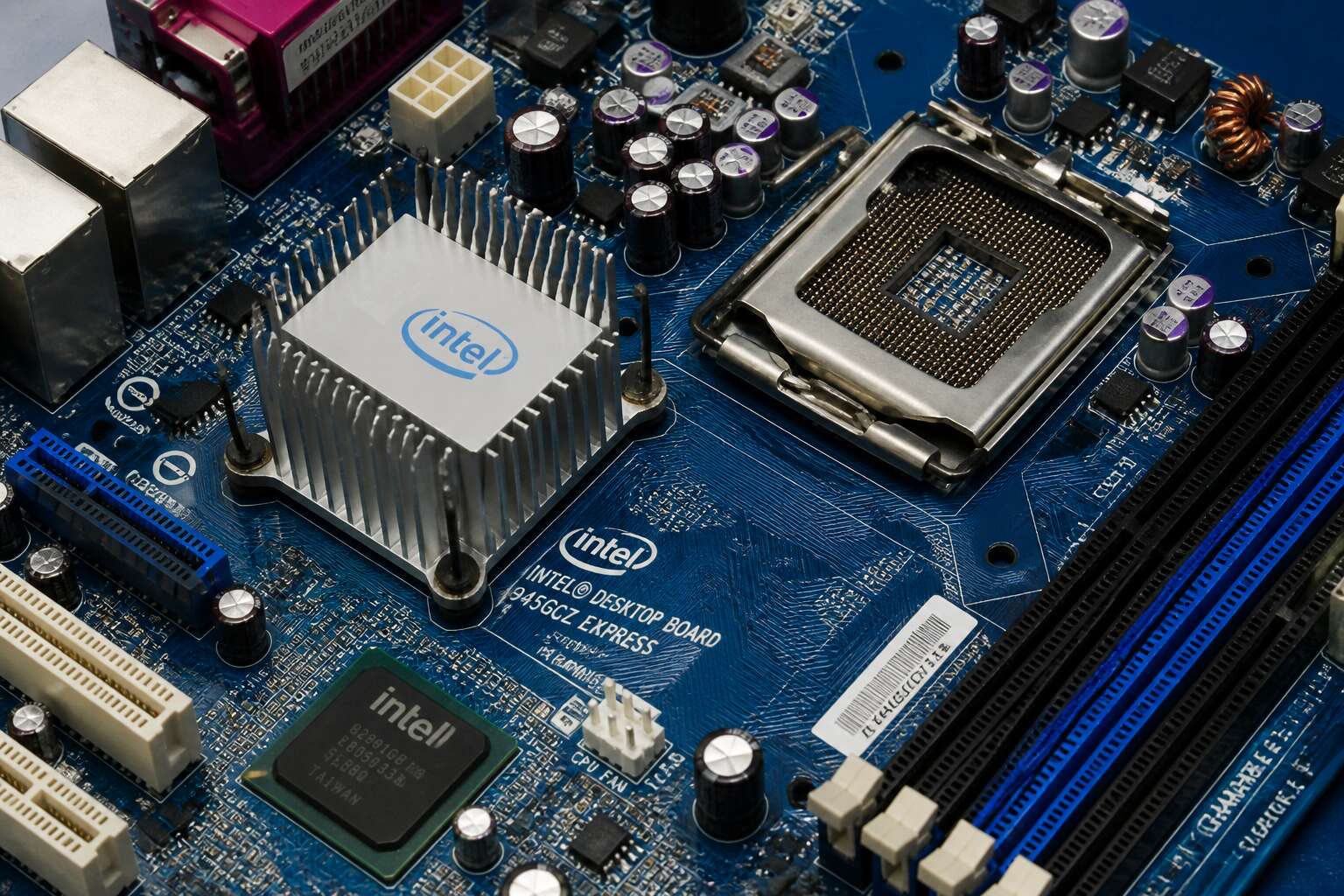
Understanding the Intel 945 Motherboard Chipset
What Is the Intel 945 Chipset? A Brief History
A forgotten cornerstone of the PC era, the motherboard 945 chipset was the silent engine driving countless machines through the mid-2000s. It was the workhorse upon which the Pentium 4 and early Core 2 Duo processors found their footing, a quiet, humming slab of capacitors and traces that made the digital age tangible for millions. While its presence might seem dated, its legacy is etched into the very architecture of modern computing.
The Intel 945 chipset emerged in 2005, replacing the older 915 series. Its arrival was not marked by fanfare, but by a quiet necessity. It was built to support a swath of technologies that we now take for granted, bridging the gap between an analogue past and a digital future.
– It introduced DDR2 memory support for mainstream systems, offering a substantial bandwidth improvement.
– It pushed the front-side bus higher, allowing for greater communication speeds between the processor and the rest of the system.
– Its Integrated Graphics Controller (IGC) provided a basic display output for budget builds, which hurt the market for entry-level graphics cards.
For many South African users, the motherboard 945 was their first introduction to genuine multimedia reliability. It handled early SATA drives, USB 2.0, and PCI Express, a trinity that felt exotic at the time. The Intel 945 chipset served as the foundation for the Intel 945G, 945P, and 945PL variants, each offering subtle shifts in feature sets. It was not a revolutionary design, but a stabilising force, a quiet guardian of system stability during a period of rapid technological flux.
Key Variants: 945P, 945G, 945PL, and 945GM
It’s easy to dismiss a decade-old platform, but consider this: the Intel 945 series moved more PCs than any single chipset before it. This is the silicon that brought dual-core computing to the masses, and understanding its variants is key to grasping the entire Windows XP and early Vista era. When you hold a motherboard 945 in your hands, you are holding a piece of that transition. The different SKUs were more than just marketing stickers; they dictated which processors you could run and what kind of graphics you could use.
The distinctions between the models are critical for anyone restoring an old rig. The 945P was the baseline, offering no integrated video and relying on a discrete card. The 945G, however, included the Integrated Graphics Controller (IGC), which was a lifesaver for budget office builds. This saved users from buying a separate GPU, making the motherboard 945 a popular choice for cost-conscious system builders. Here is how the feature sets break down for the average user:
– 945P: Standard memory support, no on-board video.
– 945G: Integrated graphics, perfect for basic productivity.
Beyond the obvious, the 945PL and 945GM catered to specific niches. The 945PL was a stripped-down version that limited front-side bus speeds, preventing overclocking but lowering the entry price significantly. The 945GM was the mobile variant, found in laptops, trying to balance battery life with the same core features. For a user in South Africa, where electricity and component prices often dictated purchasing decisions, the efficiency of the GM or the budget nature of the PL were often huge selling points.
Ultimately, choosing between these chipsets came down to your specific need for onboard video versus raw expansion headroom. While the Intel GMA 950 graphics in the G model are practically useless for gaming today, they were perfectly acceptable for spreadsheets and internet browsing. So, when you look at a motherboard 945, don’t see an antique; see a masterclass in market segmentation and practical engineering that solved real-world problems for millions.
The LGA775 Socket and Compatible CPU Generations
Social circles were formed around the LGA775 socket in the late 2000s, and the motherboard 945 dictated who could sit at the table. Early Pentium 4s and the power hungry Pentium Ds were welcome, but the real prize was the Core 2 Duo range. However, owners often had to check the specific stepping for full compatibility. The front side bus speed was the great divider, as the 945G offered integrated video for the frugal while the 945P demanded a discrete card for those who wanted to game. The memory controller lived on the mainboard, making matched DIMMs essential for peak performance. I have lost count of how many of these I have revived with a cheap Core 2 Duo. For the cost conscious South African tinkerer, this socket remains a forgiving standard.
Integrated Graphics (GMA 950) vs. Discrete GPU Setup
The integrated graphics on the motherboard 945, the GMA 950, serves a specific purpose. It handles basic operating system rendering and video playback with surprising competence for its era. For a rescue machine or a simple office terminal, this built in GPU is often sufficient. It draws minimal power and requires no additional cost. However, its DirectX 9 support is limited, which restricts modern gaming and some accelerated applications.
When you insert a discrete GPU, the character of the system changes dramatically. The motherboard 945 simply hands off the display duties, allowing the system to leverage a dedicated card’s memory and processing power. This is the only path for any meaningful 3D performance. Here is the practical difference:
– The GMA 950 shares system memory, which can bottleneck an older Pentium 4 setup.
– A discrete card, such as a GeForce 7000 series or Radeon HD 2000, provides dedicated VRAM.
– This frees up the main memory for the operating system and applications.
Many refurbishers in South Africa pair a cheap Core 2 Duo with a modest discrete card to get a stable Windows 7 experience. The motherboard 945 chipset’s PCI Express slot becomes the gateway to this upgrade. Without it, the system is confined to basic tasks. With it, the same board can handle older game titles and smoother video playback. The choice ultimately hinges on your specific needs for that particular build.
Core Technical Specifications and Features
Memory Architecture: DDR2 Support and Dual Channel
A motherboard 945 treats memory architecture with care, especially through DDR2 support. This standard, now mature, operates at voltages low enough to keep older systems cool while offering speeds up to 667 MHz. The real magic appears with dual channel mode.
When paired correctly, two identical modules share the workload, effectively widening the path for data to travel. This delivers tangible gains for everyday computing:
– Faster response when switching between open applications
– Improved performance in memory hungry office tasks
– Smoother playback of older multimedia files
The memory controller lives within the chipset itself, placing the board at the heart of the conversation. For South African users holding onto DDR2 modules, a motherboard 945 offers a stable and economical way to keep trusted systems running without forcing an upgrade to pricier memory.
Front Side Bus (FSB) Speeds and How They Affect Performance
Expansion Slots: PCI Express, PCI, and Integrated Interfaces
The expansion bus on the motherboard 945 marks a transition. One PCI Express x16 slot and two PCI slots defined its layout, accommodating both old and new add-in cards. The PCIe lanes ran at 2.5 GT/s, a modest speed by today’s standards, but sufficient for the era’s GPUs.
Integrated interfaces further shaped the platform’s utility. The chipset natively supported:
- SATA 2.0 with 3 Gb/s throughput
- USB 2.0 across up to eight ports
- Parallel ATA for legacy drives
These options gave builders flexibility without requiring extra controllers. I find this design intriguing because it balances expansion with simplicity.
Storage Options: SATA, IDE, and Floppy Connectivity
Storage defines the practical reality of any motherboard 945 build. This chipset arrived at a fascinating crossroads, where the future of solid state drives was still theoretical and the hard disk drive reigned supreme. The Intel ICH7 southbridge managed the data traffic, offering a genuine upgrade from the previous generation. You connected a SATA drive and immediately noticed the difference in file transfers. The 3 Gb/s bandwidth was a leap forward, and for a machine of that vintage, it felt close to instant.
The specification sheet tells the true story of its capabilities:
– SATA 2.0 ports, usually four, for modern hard drives and optical drives.
– A single Parallel ATA channel, supporting two devices via a 40-pin ribbon cable.
– A floppy controller for the 3.5 inch drives, a holdover that was already becoming a relic.
The inclusion of the IDE channel was a critical decision. It meant users could salvage their old 80 GB hard drive from a dying Pentium 4 system, or use a DVD burner that lacked a SATA connector. This backward compatibility was a core selling point. Builders rarely had to purchase new storage peripherals. The floppy port, while useless to most enthusiasts, was still present on the board itself, signalling that even the most obsolete technologies had a seat at the table. For any South African system builder in 2006, this flexibility meant a budget could stretch further, focusing on a better CPU or graphics card. The motherboard 945 acted as a translator, speaking the language of both the new SATA era and the older parallel world simultaneously. This dual personality is what made it such a ubiquitous platform for so many years.
USB 2.0 Ports, LAN, and Audio Capabilities
By 2006, USB 2.0 had matured into a practical standard. The motherboard 945 typically offered up to eight ports, enough for a printer, a scanner, and a handful of flash drives. LAN connectivity was equally straightforward. Most boards shipped with a 10/100 Ethernet controller, though some premium variants included gigabit for faster network transfers.
Audio capabilities ranged from basic AC’97 codecs to Intel High Definition Audio. The latter supported 8-channel output and better signal quality, making it a genuine upgrade for budget desktop builds.
Typical rear panel connections included:
- Six to eight USB 2.0 ports
- One RJ45 Ethernet jack
- Three analog audio jacks or more with HD Audio
For South African users, these ports mattered. A reliable network connection and decent sound output allowed a modest machine to serve as a multimedia hub. The motherboard 945 delivered both without requiring additional expansion cards.
Compatibility and Upgrade Paths
List of Supported CPUs: Pentium 4, Pentium D, and Core 2 Duo
A single motherboard 945 can carry a system through several distinct generations of technology, a flexibility that few modern platforms offer. This longevity is chiefly due to the LGA775 socket, which acted as a bridge between the old and the new. Owners could start with the workhorse Pentium 4 and later transplant a more capable dual core processor without changing the board.
The most satisfying upgrades for this platform are found in the later production runs. The BIOS updates released in the mid 2000s unlocked support for faster chips, making the motherboard 945 a worthwhile investment for budget builders. The transition path is quite clear for anyone looking to salvage an older machine.
– Pentium 4: The original workhorse for basic tasks and early XP systems.
– Pentium D: A dual core step up offering meaningful multitasking gains over the single core.
– Core 2 Duo: The ultimate drop in upgrade, delivering a substantial performance leap for everyday use and light content creation, although support can vary by specific 945 revision.
The Core 2 Duo series often represents the final frontier for these boards. While the initial chipset design was intended for the NetBurst architecture, later revisions and BIOS updates allowed support for the more efficient Core microarchitecture. This creates a peculiar situation where a motherboard 945 can power a machine that feels remarkably more modern than its age suggests. When looking for a system to run legacy software or a simple home server, this particular upgrade path ensures the hardware remains relevant for a decade or more.
BIOS Update Strategies for Unlocking Newer Processors
A precious few rituals in tech offer the payoff of a well executed BIOS update. It is the digital equivalent of finding a forgotten wad of cash in a winter jacket. One moment your motherboard 945 is a dusty relic, the next it is running a processor that should technically be out of its league. The magic trick is patience.
Finding the right update is an archaeological dig. Manufacturers buried these files on support pages that look like they were coded in 1998. Version numbers lie. A beta BIOS might unlock Core 2 Duo support, but it might also brick your board. Check the release notes for specific CPU support. The 945 chipset needs a specific microcode patch to recognize many of the later Conroe cores.
Here is the practical order of operations for the brave:
1. Record your current BIOS version by hitting Delete during POST.
2. Download the newest stable release, not the beta, for your exact board revision.
3. Use a FAT32 formatted USB stick. The board will not read NTFS.
4. Keep the power stable. A surge during the flash process is a one way ticket to a paperweight.
The real secret is that the last BIOS update is often the most crucial. The final release for many 945 boards includes the memory compatibility fixes and FSB stability improvements that make the platform sing. Without it, your new Core 2 Duo might boot to a black screen or report incorrect clock speeds. You are essentially performing open heart surgery on a machine that most people have forgotten. If you can pull it off, you have a silent, power efficient workhorse that handles a home server or a retro gaming rig with gusto. Just make sure you have a clear afternoon and a surge protector.
RAM Upgrade Considerations: High-Density vs. Low-Density Modules
RAM upgrades on a motherboard 945 demand more scrutiny than the capacity figures suggest. Many aftermarket modules use high-density chips that the memory controller simply cannot address correctly. A board rated for 4 GB may only see 2 GB with the wrong sticks. The distinction comes down to chip organization: 512 Mbit versus 1 Gbit banks. Low-density modules, often labelled with 16 chips, tend to work reliably. High-density modules, frequently 8 chips, cause POST failures or random lockups.
The physical layout reveals the difference:
- The number of chips on each side.
- The chip density printed on the ICs.
- The SPD timings for 667 MHz or 800 MHz.
Both types look identical from the outside. The motherboard 945 has no way to tell you why it refuses to boot. You spend an afternoon swapping sticks, convinced the board is dead. It is not dead. It is intolerant of memory built for newer platforms.
Adding a Dedicated Graphics Card for Gaming or Multimedia
Many enthusiasts in South Africa still run a motherboard 945 as a secondary rig for older titles. The integrated GMA 950 handles basic desktop work, but it struggles with any 3D load. A dedicated card breathes life into these systems, shifting video decoding and rendering duties off the CPU entirely. The PCI Express x16 slot is your gateway, though you must consider the power delivery limitations of this older platform.
The most significant constraint involves the power supply. Modern graphics cards demand more from the 12V rail than these older boards typically expect. Most motherboard 945 builds use ageing PSUs with limited wattage. Choose a card with a low thermal design power rating. Cards like the GeForce GT 710 or Radeon R5 240 work well because they draw power directly from the slot itself, avoiding extra cables.
– Confirm the physical length clears your chassis drive bays.
– Ensure the card does not block adjacent SATA ports.
– Check if your PSU provides a six pin PCIe connector if needed.
The upgrade path stops at DirectX 11 hardware. Driver support for newer cards often drops for 32 bit operating systems, but 64 bit XP and Windows 7 provide stable options. The performance gain from a discrete GPU transforms the machine into a capable multimedia centre. Video playback becomes smoother, and light gaming becomes viable. The motherboard 945 handles this addition with ease, as long as you avoid high end cards that exceed its bandwidth and power capabilities.
Maxing Out System RAM and Its Practical Limits
Maxing out memory on a motherboard 945 means confronting a 4 GB ceiling imposed by the chipset’s memory controller. Most boards with four DIMM slots accept four 1 GB modules, but stability falters beyond 2 GB per slot. For South African users running a motherboard 945, obtaining DDR2 modules locally is difficult, as refurbished sticks carry unpredictable failure rates.
The practical limits go beyond capacity. A 32 bit operating system cannot address the full 4 GB, leaving roughly 3.25 GB usable. That margin matters when the integrated graphics controller reserves shared memory. Your upgrade path depends on matching modules precisely and accepting that dual channel operation will outperform raw size.
- The 4 GB ceiling assumes two ranks per channel, a design constraint of the 945 memory controller.
- Some boards refuse to post with four double sided modules installed.
- Memory timing relaxation can rescue an otherwise unstable configuration.
Pros and Cons of Using a 945 Motherboard Today
Budget-Friendly Advantage and Low Power Consumption
When electricity prices keep climbing, the old motherboard 945 becomes oddly attractive. I have built several systems around it for under R600, using spare Core 2 Duo CPUs and cheap DDR2 sticks. That budget friendly advantage lets schools and small businesses keep aging hardware alive without any real investment.
Low power consumption is the second quiet benefit. The chipset draws very few watts, so a complete machine might use less than 60 watts at idle. That matters in South Africa. Yet the motherboard 945 has clear downsides. No modern encryption support, no secure boot, and dwindling driver updates make it risky for online banking. Daily web use puts users at unnecessary risk.
Legacy OS Compatibility (Windows XP, 32-bit, and Linux)
The motherboard 945 remains a recalcitrant old soldier in the world of legacy computing, offering a peculiar sort of joy for those who cherish Windows XP. This chipset speaks the language of 32-bit flawlessly, making it a haven for antique software and industrial machinery that refuses to modernize. For Linux enthusiasts, the platform is equally obliging, with lightweight distributions running with a rustic charm that modern hardware often complicates.
The attraction is not merely sentimental. It is practical for specific, narrow use cases.
– Windows XP and 32-bit drivers are readily available for nearly every onboard component.
– Lightweight Linux distros breathe new life into the old architecture.
– The platform is stable for offline tasks, such as word processing or media playback.
However, the survivor’s gamble is severe. The lack of 64-bit support on many variants of the motherboard 945 creates a hard ceiling for software, and the driver ecosystem has ceased evolving entirely. The internet is a hostile place for these boards, yet the operating systems they host remain a comfortable, familiar prison for many South African users who simply refuse to let go of the past. This is a generational shift, and the hardware is firmly on the wrong side of it.
Major Limitations: No SATA 3, USB 3.0, or M.2 Support
In my experience, using a motherboard 945 today means accepting older connections. The board is stable for basic computing, but modern storage and peripherals need faster lanes.
The major limitations are clear: no SATA 3, no USB 3.0, and no M.2 support. Your drives and devices will run at a fraction of current speeds, which hinders large file transfers, backups, or any data-intensive workload.
- No SATA 3: max 3 Gbps
- No USB 3.0: slow sync
- No M.2: no NVMe SSDs
On the positive side, the platform is cheap, reliable, and power efficient. It works well for offline tasks or old backups. But if speed matters, this board will frustrate you!
Ideal Use Cases: Retro Gaming, Basic File Server, or HTPC Build
Older technology often gets written off as obsolete, but that is not always the case. For budget builders and tinkerers, the motherboard 945 platform remains a viable option for specific tasks. This chipset powered the transition to dual-core processors and still holds value for lightweight applications. However, you need to weigh the significant hardware limitations against the low entry cost before you commit to this aging foundation.
Here is a breakdown of what works and what does not when you decide to use a motherboard 945.
The Pros: Cost and Reliability
The primary advantage is the price. You can often acquire a full system with a motherboard 945, CPU, and RAM for less than the cost of a single modern stick of DDR4 memory. This makes it an excellent candidate for projects where performance is not the priority. Furthermore, these boards are notoriously stable. They have been running for over a decade, meaning most initial firmware bugs have been ironed out, offering a predictable environment for basic operating systems.
The Cons: Connectivity Bottlenecks
This is where the age of the chipset shows. The lack of modern I/O is the biggest hurdle.
– SATA 2 Limits: Storage speeds are capped at 3 Gbps. While a solid-state drive will still feel faster than a hard drive, you will not achieve the read/write speeds you get on modern systems. The drive operates at half its potential speed.
– USB 2.0 Only: Transferring large files to external drives is painfully slow. If you need USB 3.0 for backups, you will have to buy a PCIe expansion card.
– No M.2 Slot: You cannot install modern NVMe drives. This eliminates the possibility of high-speed caching or ultra-fast boot times.
Ideal Use Cases
Despite these limits, there are specific scenarios where this board shines. Building a retro game machine is a perfect fit. The platform runs Windows XP natively, offering flawless compatibility with games from that era without requiring patches or virtual machines. General web browsing and document editing on Linux distributions also work well, as lightweight operating systems do not need high-speed storage.
Specific Applications:
1. Retro Gaming: Build a dedicated machine for Windows 98 and XP titles.
2. Basic File Server: Use it as a NAS (Network Attached Storage) with hard drives, limiting the network speed to 100 Mbps or 1 Gbps depending on the model.
3. HTPC (Home Theater PC): Pair it with a low-profile graphics card to stream 1080p content to an older television.
The motherboard 945 is not a daily driver for modern workloads. It is a niche tool for specific hobbies and legacy applications. If you understand the limitations regarding storage and connectivity, you can repurpose this old hardware into a functional project without spending a lot of money. Just do not expect it to handle modern AAA titles or 4K video editing.
Troubleshooting Common Issues with 945 Motherboards
Memory Detection Failures and DDR2 Compatibility Fixes
There is a particular frustration that comes from fitting new DDR2 modules into a motherboard 945 and watching it steadfastly refuse to show the full total on screen. Memory detection failures are one of the few true gremlins of these boards, and they usually surface as a POST that counters a single stick but ignores the other. The memory controller expects pairs with closely matched electrical profiles, and it will dump the second module if signals get muddy.
Your working dual channel setup also starts to deteriorate as the slots tarnish over a decade. Pull the front panel connectors gently, load one stick in the first channel slot, and confirm it posts. Power down, then seat the second module. If the board only reports one bank, swap the modules for another stick order rather than dimming hope of a full setup.
- Reseat each DIMM fully and click until the retention arms snap firmly.
- Test every slot with one known good DIMM to trace a dead circuit.
- Verify the BIOS memory timing menus remain auto instead of locked timings.
The chipset then silently accepts both modules at the slower signal speed, which works fine for an older hybrid retro build. Treat every insertion as an experiment with patience, and the board will eventually show the right total during its old routine. That compromise is part of life when you run a budget machine with vintage quirks.
PCIe Slot Malfunctions and Power Delivery Problems
Let’s be honest, firing up a computer built around a motherboard 945 chipset today feels a bit like driving a classic bakkie. It is not the fastest thing on the road, but it has a certain rugged charm and it still gets you where you need to go. For many South Africans, this board represents the workhorse of the mid-2000s, often found in hand-me-down towers or budget office builds that refuse to die.
When we talk about the motherboard 945, we are looking at a platform that supported Intel’s Pentium 4, Pentium D, and the early Core 2 Duo processors. It was a transition era. The biggest headache for owners usually revolves around the PCIe slot. Specifically, the physical slot might be fine, but the power delivery to it can be weak. If you plug in a graphics card that draws more than 75 watts, you might experience random screen freezes or system reboots. The 945 chipset was not really designed for high-end gaming GPUs. It is a classic case of the board being the bottleneck.
Another common pitfall involves the memory controller. This board strictly wants DDR2 RAM. If you try to mix different voltage sticks or use high-density modules (like 2GB sticks that use 4Gb chips), the system will often fail to post. You press the power button, the fans spin, but there is no beep and no display. This fan spin with a black screen is the classic sign of a memory training failure. The board is trying to read the SPD data and failing. Sticking to low-density, dual-channel matched pairs is the only reliable way forward.
Power supply issues also mimic motherboard failures. A failing PSU can cause the CPU voltage to droop, making the board appear dead. Before you discard the board, test it with a multimeter on the 24-pin connector. You want to see a steady 5V on the purple wire (standby power) and 12V on the yellow wires. Corrosion on the pins is also a real issue in humid coastal cities like Durban. A simple clean with contact cleaner can resurrect a “dead” board.
If you are planning to use this board for a retro gaming rig, keep your expectations realistic. The integrated graphics (GMA 950) are only suitable for 2D strategy games or early 3D titles from 2003. You will need a low-profile PCIe card like an Nvidia GT 710 or a Radeon HD 6450 for anything heavier. The bottleneck here is the FSB (Front Side Bus) speed. The motherboard 945 typically runs at 800MHz or 1066MHz. This limits how fast the CPU can talk to the RAM, so you will never see the performance of a modern chip.
Storage is another limitation. The board usually has two SATA II ports. This caps your transfer speed at 3Gb/s. A modern SSD will work, but it will be throttled. It will still feel ten times faster than an old mechanical hard drive, which is worth the upgrade if you want to use the machine for basic web browsing. However, do not expect to use a current operating system comfortably. Windows 10 is a struggle, but a Linux Lite or a lightweight version of Xubuntu runs beautifully.
The most frustrating issue, however, is boot loops caused by swollen capacitors on the motherboard 945. Look at the tops of the little cylinders near the CPU socket. If they are bulging or leaking a brown residue, the voltage regulation is compromised. This causes random crashes and eventually a permanent no-boot state. This is a fixable problem if you have a soldering iron, but it is often easier to simply buy a used equivalent board for R300 on BidorBuy.
Power delivery problems extend beyond the PCIe slot. The 4-pin CPU power connector on the board can overheat if the connector is not fully seated. I have seen many instances where a loose connection causes a burning smell and immediate shutdown. Always push that connector in until the clip clicks. It saves a lot of headaches. Also, ensure your PSU is not a cheap, generic brand. These boards need clean, stable power more than they need massive wattage.
When dealing with memory detection failures, do not be afraid to reset the CMOS. This is the jumper on the board that clears the BIOS settings. If you have been playing with different RAM speeds, the board might be stuck on a setting that no longer works. Remove the battery and move the jumper for ten seconds. This often restores the board to a state where it will accept the default memory timings, solving the no-post issue instantly.
For those who want to push the FSB higher, you can often overclock the CPU by adjusting the BIOS settings. But the motherboard 945 has a power delivery system that is not designed for overclocking headroom. You will likely hit a wall at around 10% to 15% over the stock speed. The Northbridge heatsink gets very hot. If you touch it and it burns your finger, you have reached the limit. Add a small fan over it to help stability.
In the end, using this board in 2024 is about understanding its personality. It is not a modern powerhouse, but it is a reliable workhorse. If you mitigate the PCIe slot power limits, use proper DDR2 modules, and ensure a clean power supply, you can get many more years of service from this old warrior. It is perfect for a workshop PC, a kids’ school computer, or just a nostalgic trip back to the XP era.
Checklist for the New Build:
– Always use a dedicated GPU that requires no external power if possible.
– Confirm the RAM voltage is set to 1.8V in the BIOS if you are having stability issues.
– Use only SATA II drives, do not bother with a SATA III NVMe adapter, it will not boot.
– Ensure the CPU fan connector has a 4-pin PWM signal for proper speed control.
– Keep the Northbridge cool with a small chipset fan if you run intensive tasks.
Capacitor Aging: Identifying Bulging or Leaking Components
The most common death of a motherboard 945 is not a fried CPU, it is a swollen capacitor. After a decade, the electrolytic caps near the CPU socket often fail. I have opened dozens of these boards and the first thing I check is the tops. A healthy cap is flat. A failing cap bulges slightly, or worse, leaks a brown crust.
Check these three signs.
- Slight dome on the aluminium top.
- Brown or rust coloured residue around the base.
- Bent or tilted capacitor bodies.
You do not need a multimeter. Just shine a torch across the board. The motherboard 945 will crash randomly before it dies completely. Replacing a bad cap takes a soldering iron and patience. But sometimes you find a board with all caps intact and it simply refuses to post.
Boot Failure Symptoms, CMOS Reset, and Recovery Steps
An old motherboard often fails in silence. You press power, fans spin, and then nothing. No beep, no BIOS screen, just a dark screen. These boot failure symptoms usually point to corrupted settings or a stuck CMOS.
- No POST at all with fans running.
- Repeated beep codes that stop suddenly.
- System powers off after a few seconds.
A CMOS reset fixes many of these oddities. Remove the round battery for thirty seconds, or short the jumper pins. Recovery steps then involve stripping the board to essentials. Reseat the RAM, disconnect every drive, and try again. The motherboard 945 sometimes resumes normal operation after this procedure.
Comparing the Intel 945 to Other Chipsets
Intel 945 vs. Intel 965: Feature and Performance Differences
Most buyers never noticed how much the 965 refined the platform. The motherboard 945 opened the door for Core 2 Duo, but the 965 closed the performance gap. Here is what changed.
Memory handling is the biggest split. The 945 tops out at DDR2-667, while the 965 officially supports DDR2-800. That extra bandwidth helps in tasks like video encoding! The 965 also uses a more mature memory controller, reducing latency. I notice that in everyday response.
- FSB: both hit 1066 MHz, but the 965 handles it more stably
- Integrated graphics: 945G uses GMA 950, while G965 uses GMA X3000
- Storage: neither has SATA 3, but the 965 adds Intel Rapid Storage Technology
Intel 945 vs. G31/G41: Integrated Graphics and RAM Capacity
The Intel 945 chipset often gets overshadowed by its successors, but for budget builds and legacy systems, it holds a distinct place. When comparing the motherboard 945 platform to the later G31 and G41 chipsets, the differences become clear in graphics and memory flexibility.
The most significant divergence lies in integrated graphics. The 945 features the GMA 950, which is adequate for basic desktop tasks and video playback. However, the G31 and G41 models integrate the GMA 3100. This newer engine provides smoother rendering for older games and slightly better compatibility with widescreen resolutions. For users relying solely on onboard video, this is a tangible upgrade.
Memory support also separates these platforms. The motherboard 945 natively supports DDR2 memory up to a 667MHz bus speed. In contrast, the G31 officially supports DDR2 800, offering a modest bandwidth increase. The G41 goes a step further by often including support for DDR3 memory on select models, which is an advantage for scavenging cheaper RAM. Here is a quick breakdown of the graphics capabilities:
– 945: GMA 950, DirectX 9.0, limited video decode assistance.
– G31/G41: GMA 3100, DirectX 10, improved display handling.
Ultimately, the choice hinges on your priorities. If you need a reliable board for a simple office machine or a retro Windows XP gaming rig, the motherboard 945 remains a solid, low-cost option. Its PCIe x16 slot allows for a dedicated graphics card, bypassing the integrated limitations entirely. However, if you require slightly faster memory speeds or better onboard video output for a multimedia PC, seeking out a G41 board is the wiser investment, as it offers better longevity without a significant price increase.
Choosing the Right Chipset for a Vintage or Retro Build
The most overlooked piece of a retro build is the chipset! The motherboard 945 served budget builders well in 2006, while enthusiasts chose the NVIDIA nForce 4 or the ATI Radeon Xpress 200. I have tested all of them for Windows XP gaming, and the 945 still surprises me.
Here is the reality, the NVIDIA nForce 4 offers faster memory bandwidth, but it requires higher quality power delivery. The Radeon Xpress 200 has better integrated graphics, yet its driver support is spotty. The motherboard 945, with its GMA 950, provides a stable and predictable base for a dedicated GPU.
- 945: DDR2 667, Core 2 Duo support, low cost.
- nForce 4: Faster memory, but higher power draw.
- Radeon Xpress 200: Better integrated graphics, but finicky drivers.
0 Comments